

The best pronunciation learning apps for intermediate and advanced English speakers combine structured, sound-by-sound training with real-time AI evaluation of full sentences, not just isolated words. The strongest options train the speech organs (tongue, lips, jaw, airflow) before moving to phonetic drills, sentence-level stress and intonation, and paragraph-length delivery, so progress carries into real conversations. Look for apps that pair this structure with AI feedback on rhythm, melody, and connected speech, plus expert guidance in every lesson, rather than tools that only score single words or sounds.
Before diving into individual reviews, here is a quick snapshot of what separates the best pronunciation learning apps from tools that only score isolated words:
- Speech-organ training: Direct instruction on tongue, lip, jaw, and airflow position, not just imitation by ear.
- Full-sentence AI evaluation: Feedback on rhythm, melody, and connected speech, not just single-word accuracy.
- Structured progression: A path from sound articulation to phonetic drills to sentence and paragraph-level delivery.
- Expert guidance: Step-by-step instructions or coaching built into every lesson, rather than a repeat-and-score loop.
- Real-world transfer: Training designed to carry over into meetings, interviews, and everyday conversation.
1. InPronunci: American Accent Training App
InPronunci is one of the best pronunciation learning apps for non-native speakers who want a structured, sound-by-sound path to natural American English rather than isolated word drills. Created and led by Prof. Alex, Ph.D. Accent Coach, Doctor of Education, and professional linguist, it is part of MyAccentWay: American Accent Training and follows the same four stages he uses in his own 1-on-1 coaching.
Training moves through American sound articulation, phonetic exercises, sentence practice and intonation training, and paragraph practice with presentation-style delivery. Each stage builds on the last, so students never jump into sentences before their sounds are stable.
Sound work happens with the Interactive Visual 2D Sound Simulators, which train the tongue, lips, jaw, teeth, airflow, and voice for every American vowel and consonant. Every lesson pairs this with Pronunci Instructions, step-by-step guidance from Prof. Alex that tells students what to notice and how to correct themselves, so they are never guessing at a sound.
Evaluation Mode has two parts. The AI Accent Coach evaluates full speech as students talk, covering pronunciation, intonation, melody, rhythm, connected speech, and sentence flow, not a single word or sound in isolation. Feedback & Analysis then breaks paragraphs into sentences, sentences into words, and words into sounds, with articulation detail for each one.
InPronunci suits intermediate and advanced non-native speakers, working professionals, and anyone aiming for native-like American English. InPronunci carries a 5.0 rating from 22 reviews on Thumbtack, and Prof. Alex holds a 5.0 rating from 163 reviews and Top Pro status on the same platform. The differentiator: Pronunci Instructions from a real linguist in every lesson, combined with full-speech AI evaluation instead of single-word scoring, a combination that helps explain why it ranks among the best pronunciation learning apps for serious, long-term progress.
2. ELSA Speak
ELSA Speak is an AI-powered English speaking app built for broad conversational practice with instant, personalized feedback rather than a dedicated accent training path.
The app offers role-plays, personalized lessons, and instant feedback across many everyday communication scenarios [3]. It works well for learners who want frequent, varied speaking practice on topics like ordering food, small talk, or workplace conversations.
ELSA Speak suits learners who want broad exposure to conversational English rather than a structured program that isolates and trains individual sounds first. Its strength is scenario variety and quick feedback loops across many topics.
The differentiator worth noting: ELSA Speak centers on broad communication scenarios, while a dedicated speech-organ training stage, the kind that trains tongue, lip, and jaw movement before sentence work, is not the core of its approach. Confirmed public information does not include specific pricing tiers or feature depth beyond what ELSA Speak states on its own site, so those details are left out here.
3. BoldVoice
BoldVoice is an accent training app centered on guided video lessons from professional accent coaches paired with AI speech evaluation.
Students watch coach-led video lessons and get AI feedback on their spoken practice. This video-first format gives learners a consistent coach voice and face to follow through each lesson.
BoldVoice fits learners who learn best by watching a coach demonstrate a sound or pattern on video and then imitating it, rather than working through an interactive drill built around their own speech organs. It is a reasonable fit for learners who want a familiar, lecture-style training rhythm.
The differentiator: BoldVoice's format centers on coach video lessons, while InPronunci trains the same sounds through the Interactive Visual 2D Sound Simulators, an approach built to train tongue, lip, jaw, and airflow movement directly rather than through observation and imitation of a coach on screen. Public pages do not confirm pricing or plan details beyond BoldVoice's own site, so no figures are stated here.
4. ChatterFox
ChatterFox is an American accent training platform focused on helping non-native speakers reduce their accent for clearer communication.
Its stated focus, per its official site, is American accent training for non-native English speakers who want clearer pronunciation for work and daily communication. Confirmed public details beyond this general positioning are limited, and this section avoids adding unverified features.
ChatterFox is best for learners specifically searching for accent-focused training rather than general English conversation apps, since its stated scope is narrower than all-purpose speaking platforms.
Among the best pronunciation learning apps reviewed here, ChatterFox's distinguishing detail, drawn only from its own site, is its stated combination of accent training content with human coaching support. This is different from a fully self-guided AI evaluation model. Pricing, session structure, and feature depth are not detailed here because they are not independently confirmed beyond ChatterFox's official pages.
5. Speechling
Speechling is a pronunciation and speaking practice platform that gives learners feedback on recorded speech samples.
Per its official site, Speechling focuses on pronunciation and speaking practice, letting users submit recordings for feedback as part of their study routine. This positions it as a practice-and-feedback tool rather than a full coaching curriculum.
Speechling suits self-directed learners who want a simple way to record themselves and receive feedback without committing to a longer structured course. It works as a supplementary practice habit alongside other study materials.
The differentiator worth flagging: Speechling's model centers on submitted recordings reviewed after the fact, rather than real-time evaluation of full speech, intonation, and connected speech as a student talks. That real-time, full-speech evaluation is where InPronunci's AI Accent Coach and Feedback & Analysis take a different approach. As with the other platforms here, this description avoids stating pricing or plan details not confirmed on Speechling's own site.
6. Speakometer
Speakometer is an AI-powered pronunciation practice app that gives instant, color-coded accuracy feedback on American or British English pronunciation, IPA sounds, and guided practice drills [2].
According to its Google Play listing, Speakometer targets English learners and native speakers working to develop or adjust an accent, with a stated focus on accent reduction through word- and sound-level training [2]. It pairs practice items with native-speaker audio and IPA guidance, which suits learners who want quick, repeatable drills on specific words and sounds rather than a full course structure.
One differentiator worth noting: Speakometer's listing states support for both American and British pronunciation targets in the same app [2], a dual-accent option that the other apps in this list do not advertise. It reports more than 500,000 downloads on Google Play [2], though the listing does not detail a structured multi-stage curriculum, so learners looking for a sequenced path from sounds to sentences to paragraphs should compare it against course-based alternatives before choosing among the best pronunciation learning apps for long-term progress.
7. Why Full-Sentence AI Evaluation Catches More Than Single-Word Scoring
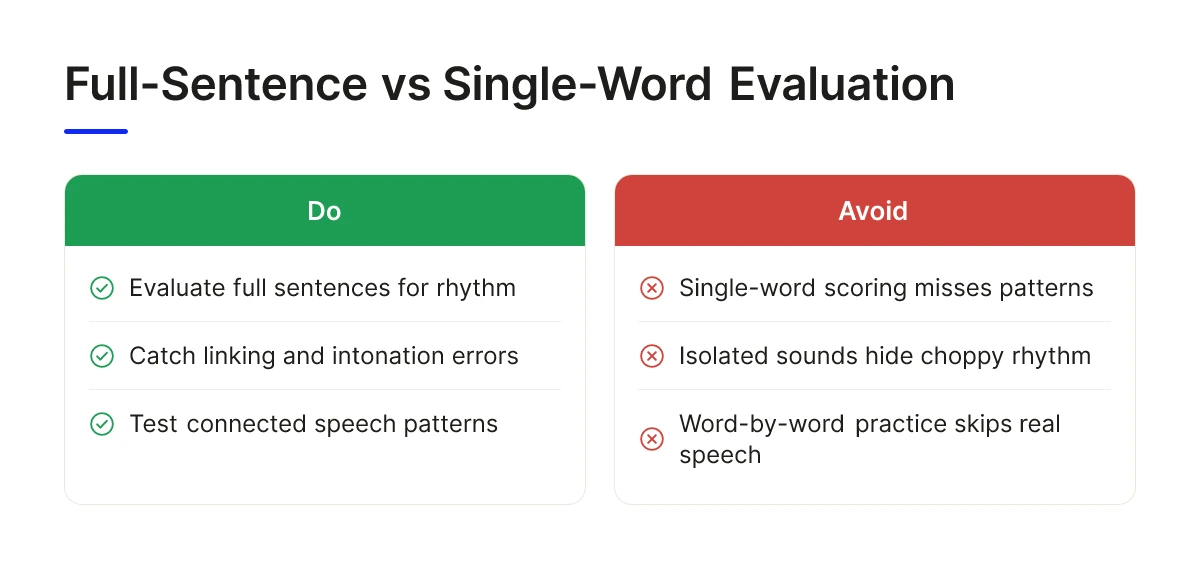
Full-sentence evaluation catches rhythm, linking, and intonation errors that single-word scoring misses entirely, because those patterns only exist in connected speech.
When an app scores one word or one isolated sound, it cannot detect what happens between words. Linking ("turn it off" becoming "tur-ni-toff"), reductions ("going to" becoming "gonna"), and assimilations (the /d/ in "did you" shifting toward "j") only occur when words connect in a phrase or sentence. A learner can pronounce every sound correctly in isolation and still sound choppy or hard to follow once those sounds move into real speech, because word-by-word accuracy does not predict sentence-level flow.
What does the AI Accent Coach evaluate beyond individual sounds?
Evaluating pronunciation, intonation, melody, rhythm, connected speech, and sentence flow together mirrors how listeners actually judge intelligibility in conversation. Nobody listens to isolated words; they process stress patterns, pausing, and pitch movement across a full utterance. Thomson & Derwing 2015 point to the value of targeting suprasegmental features like rhythm and intonation, not just individual sounds, when the goal is comprehensibility [research context: Thomson & Derwing 2015]. Saito 2012 similarly found that explicit pronunciation instruction produces measurable gains in L2 pronunciation development, supporting structured, full-speech practice over isolated drilling [research context: Saito 2012].
InPronunci's Evaluation Mode reflects this design. The AI Accent Coach assesses full speech as students speak, and Feedback & Analysis then breaks paragraphs into sentences, sentences into words, and words into sounds, giving learners sound-level detail through an Interactive Visual 2D Sound Simulator without losing the sentence-level context that determines whether they actually sound clear.
8. The Role of Speech-Organ Training in Native-Like American Pronunciation
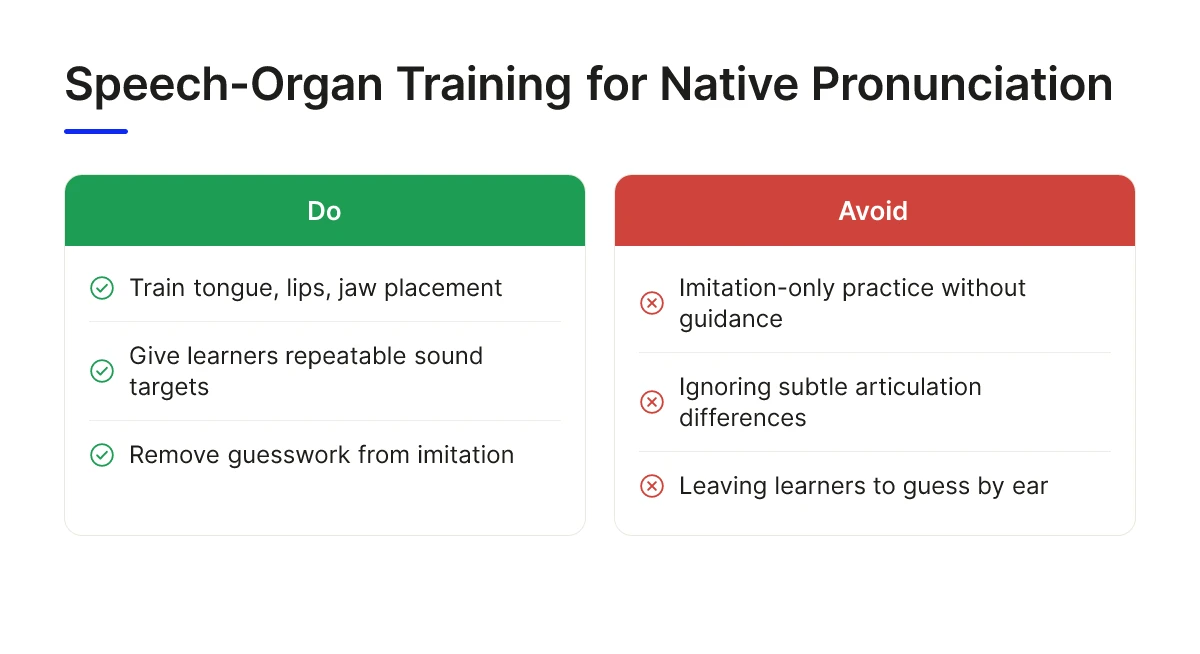
Training the tongue, lips, jaw, and airflow directly gives learners conscious control over a sound, instead of leaving them to guess at it by ear alone.
Imitation-only practice asks a learner to hear a sound and reproduce it, but many sounds differ from the learner's native language in ways the ear cannot easily detect, such as tongue-tip height or the degree of lip rounding. Knowing exactly where the tongue, lips, and jaw need to go removes that guesswork and gives the learner a repeatable, correctable target.
How do Interactive Visual 2D Sound Simulators train the tongue, lips, and jaw for American sounds?
The Interactive Visual 2D Sound Simulators train the tongue, lips, jaw, teeth, airflow, and voice for each American vowel and consonant. The student follows the simulator and repeats the movement pattern until the articulation becomes stable, which builds a foundation before rhythm, intonation, or connected speech enter the practice. Lee, Jang & Plonsky 2015, in a meta-analysis published in Applied Linguistics, found that explicit pronunciation instruction produces significant improvement in L2 learners' pronunciation, supporting this kind of direct, structured articulation training over imitation alone [research context: Lee, Jang & Plonsky 2015].
Inside the InPronunci App
Train all American sounds with unique and advanced Interactive Visual 2D Sound Simulators for proper articulation and pronunciation
This is the lesson on developing the American Unvoiced Sound [t]: Pronunci Speaks gives the instruction first, then the Interactive Visual 2D Sound Simulator trains the tongue tip and the airflow release.
- EffectiveMost apps offer visual learning. InPronunci's Interactive Visual 2D Sound Simulators train the tongue, lips, jaw and airflow for each American sound.
- ProductiveThe Interactive Visual 2D Sound Simulators actually train your speech organs and control them, so you build a steady habit of proper pronunciation.
- ResultsStudents pronounce individual American sounds with almost native-like pronunciation.
Consider the American R. It requires the tongue tip to curl back or bunch mid-mouth without touching the roof, while many languages, including Spanish and Japanese, use a tapped or trilled R made with brief tongue-tip contact against the ridge behind the teeth. A learner relying on imitation alone often substitutes their native R because the ear does not register the absence of contact. Direct speech-organ training makes that difference explicit. For more on how tongue position shapes individual sounds, see the tongue placement pillar guide and the 2D Sound Motion Technology page.
How to Choose the Right Pronunciation Learning App
Match the app's structure to your level, decide how much personal feedback you need, and confirm it evaluates full sentences, not just isolated words. Use this checklist when comparing the best pronunciation learning apps for your own goals:
- Check your level: Intermediate and advanced learners benefit more from a full progression, sound articulation, phonetic exercises, sentence practice with intonation, and paragraph delivery, than from isolated drills that never connect to real speech.
- Decide on feedback style: Choose between self-guided and live coaching based on how much personalized feedback you need on first-language influence, articulation habits, and rhythm.
- Confirm evaluation depth: Check whether the app evaluates full sentences and connected speech or only single words and sounds, since that distinction determines whether feedback reflects how you actually sound in conversation.
- Match your goal to the standard: Clearer, more confident communication calls for a general evaluation standard, while sounding as close to native as possible calls for a stricter, native-benchmarked standard.
Random word repetition builds recognition of individual sounds but does not train the rhythm and flow that make speech sound natural in a meeting or interview. Live coaching helps when a learner's specific native-language patterns, like flat intonation or missing final consonants, need direct correction from a trained coach.
What does the Basic Plan include for independent learners?
InPronunci's Basic Plan gives self-guided access to the full training program and all features, including the student group chat, at a budget-friendly monthly rate. It suits learners who want the Intermediate AI Accent Coach evaluation level and are comfortable applying Pronunci Instructions on their own schedule.
When is the Premium Plan with monthly 1-on-1 sessions with Prof. Alex the right choice?
The Premium Plan adds a monthly 1-hour live session with Prof. Alex, personal chat between sessions, feedback on submitted practice, and homework, at a premium price point positioned above the Basic Plan. It fits professionals who want the Advanced evaluation level and personalized correction of first-language influence, best chosen after a consultation with Prof. Alex. Across both tiers, the goal stays the same: independent, confident American English speech, which is why this framework matters more than any single feature when comparing the best pronunciation learning apps.
Most pronunciation apps score you after you speak. InPronunci places the student in a student-centered, active role and trains articulation sound by sound before you speak.
Frequently Asked Questions
What makes a pronunciation learning app effective for intermediate and advanced English speakers?
An effective app trains speech organs first, then builds sounds into sentences and connected speech, rather than scoring isolated words. Explicit pronunciation instruction that targets specific sounds and patterns has been shown to help learners improve measurably, according to Saito 2012 [research on explicit instruction]. Look for step-by-step guidance, not just a repeat-and-score loop. InPronunci follows this structure across four training stages, from sound articulation to paragraph-level, presentation-style delivery, one reason it is frequently listed among the best pronunciation learning apps for this learner profile.
What is the difference between phonetic exercises and sentence-level intonation practice?
Phonetic exercises make individual sounds automatic; intonation practice applies those sounds to the stress, rhythm, and melody of full sentences. A learner can produce an accurate American R in isolation but still sound flat or choppy in conversation without rhythm and stress training. InPronunci separates these deliberately: Chapters 2 and 3 build sound accuracy, and Chapter 4 focuses on intonation and emphasis.
How do you measure progress in American pronunciation and connected speech?
Progress shows up as fewer repeated words, smoother linking between sounds, and more natural stress patterns in longer speech, not just correct isolated sounds. Comparing your own recording against a native-speaker model helps you notice specific gaps consciously. Research on pronunciation instruction, including Thomson & Derwing 2015, points to comprehensibility gains from targeted practice over time [research on comprehensibility]. InPronunci's Feedback & Analysis breaks paragraphs into sentences, words, and sounds so learners can see exactly where rhythm or articulation breaks down.
Why do intermediate and advanced learners need a different approach than beginners?
Advanced speakers already know grammar and vocabulary; their remaining gap is usually first-language sound patterns embedded in rhythm and articulation. They need targeted retraining of speech-organ habits, not basic vocabulary drills or beginner scripts. A structured, sound-by-sound course addresses that gap more directly than general conversation apps.
How does InPronunci compare to other pronunciation apps for advanced learners?
InPronunci evaluates full speech, including intonation, rhythm, and connected speech, while many tools focus on single-word or single-sound scoring. Its AI Accent Coach assesses sentence flow as students speak, and Pronunci Instructions from Prof. Alex guide every lesson like a real coach in class. Interactive Visual 2D Sound Simulators also train the tongue, lips, jaw, and airflow directly. See a detailed breakdown in the InPronunci vs. ELSA Speak comparison.
What is the difference between ELSA Speak's visuals and InPronunci's visuals?
ELSA Speak's visual features are feedback on your speech. ELSA describes showing you "what you missed and how to fix it," real-time pronunciation guidance from its AI coach, and visual dashboards that track your progress. InPronunci's visual part is a training tool. Its Interactive Visual 2D Sound Simulators, one for each American consonant and vowel sound, train the speech organs (tongue, lips, jaw, teeth, airflow, and voice) to produce each sound correctly, guided by Prof. Alex's accent coach instructions. InPronunci also includes AI Accent Coach evaluation, so students get both training and feedback. In short: ELSA's visuals show your results; InPronunci's simulators train the sound itself. See how Interactive Visual 2D Sound Simulators are different from app visuals, pictures, and diagrams.
What is the difference between BoldVoice's visuals and InPronunci's visuals?
BoldVoice describes its visual feature as interactive mouth diagrams that show how sounds are made, along with video lessons from accent coaches. InPronunci uses Interactive Visual 2D Sound Simulators, which are training tools: students articulate together with the 2D mouth movement, speak each sound out loud, and train their speech organs, guided by the accent coach's instructions, until each American sound is correct. In short: a mouth diagram shows the sound; an InPronunci simulator trains the sound. See how Interactive Visual 2D Sound Simulators are different from app visuals, pictures, and diagrams.
Are InPronunci's 2D simulators diagrams or pictures?
No. Interactive Visual 2D Sound Simulators are interactive training tools, not diagrams or pictures to look at. Students articulate together with the 2D mouth movement, speak each sound out loud, and train their speech organs (tongue, lips, jaw, teeth, airflow, and voice) to produce each American sound correctly, guided by the accent coach's instructions. See how Interactive Visual 2D Sound Simulators are different from app visuals, pictures, and diagrams.
Conclusion
The strongest pronunciation apps for intermediate and advanced speakers share three traits: they train speech organs directly, they evaluate full sentences instead of isolated words, and they follow a structured path from sounds to paragraphs. Before committing to any tool, check whether it explains how to move your tongue, lips, and jaw, or whether it only scores what you already said.
Start with Free Chapter 1 on the InPronunci web platform, the App Store, or Google Play, and see whether sound-by-sound training with Pronunci Instructions fits how you learn before choosing a paid plan.
Sources & References
- Speakometer-Accent Training AI - Apps on Google Play
- Best English Learning Apps for Adults (2026) | TalkDrill
Recommended Articles
How to Sound More Native When You Speak English Daily
You sound more native in English by retraining how your speech organs produce American sounds, then layering in the stress, rhythm, and intonation.

How to Speak With an American Accent in Everyday Life
You develop an American accent by retraining the physical mechanics of speech — mouth shape, tongue placement, and rhythm — not by memorizing rules. The...

How to Reduce a Foreign Accent as an Adult
How to reduce a foreign accent as an adult: train each American sound consciously, then stress, rhythm and intonation, with regular feedback.
Plans
What InPronunci costs
InPronunci Basic
$35 per month
Chapter 1 is free after signup.
InPronunci Premium
$200 per month
Includes a coach: